Virtual Cockpit

Marine Barometer

Classic-style Barometer, Altimeter, Logger, and Pressure Trend Graph for Android


Welcome

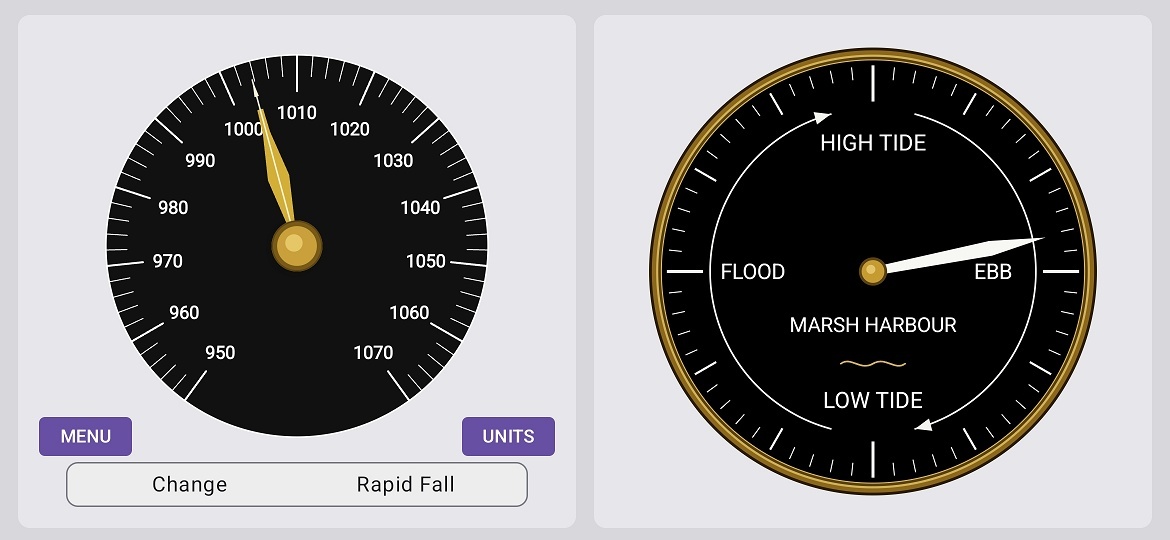
Marine Barometer turns an Android phone or tablet with a built-in pressure sensor into a simple, readable weather instrument. It combines a sea-level-corrected barometer, an aircraft-style altimeter, a reference needle, optional pressure logging, and a strip-chart pressure trend graph.

Current Version: 1.5.19 beta

Release Date: June 8, 2026

Beta note: Marine Barometer is still under active test. Version 1.5.19 includes explicit QNH/QFE/QNE and LINK/UNLINK altimeter-reference controls. The next planned development milestone is the simplified offset-first calibration workflow.

Marine Barometer landscape screen with barometer and altimeter dials
Landscape view

Highlights

Marine Barometer landscape screen with barometer and altimeter dials
QNE/Linked Mode

Altimeter

In "Linked" mode the altimeter setting is linked to the barometer reading. In "QFE" mode the altimeter should always read zero when the presure sensor on your phone or tablet is calibrated, and if the device is at the elevation that it was calibrated for - which is usually its home base. A ±50 foot error is not cause for alarm, but you should step through the calibration process if the error is greater than ±100 feet.

Marine Barometer is part of the Virtual Cockpit family, but it is also useful on its own at home, on a boat, in an RV, at a campsite, or while travelling.

[Top]


Download

Current Version: 1.5.19 beta

Click the icon below to download the APK installation file:

Download Marine Barometer APK
Download Marine Barometer v1.5.19 beta

Website maintenance note: The download link above expects the APK file to be named Marine_Barometer_v1.5.18.apk and stored in the same folder as this page.

Installation Steps

  1. Tap the download link above.
  2. Open your Downloads folder and tap the APK file.
  3. If prompted, allow installation from this source.
  4. Let Google Play Protect scan the file.
  5. Follow the prompts to complete installation.

Important: This app needs a phone or tablet with a built-in barometric pressure sensor. Many modern Android devices have one, but not all do. The app is intended for Android 6.0 or higher.

[Top]


Screens

Marine Barometer landscape screen showing larger dials and control buttons
Landscape view

Marine Barometer Trend Graph
Trend Graph

Marine Barometer calibration dialog with fields for known elevation and known pressure
Calibration screen

[Top]


Instructions

Quick Start

  1. Install the app.
  2. Confirm that your device has a pressure sensor.
  3. Open MENU → SETUP and choose or reauthorize the log folder if you want to use Log + Graph.
  4. Find the elevation of your home, marina, campsite, or other reference location.
  5. Look up the current local sea-level pressure from a reliable nearby weather report.
  6. Open MENU → CALIBRATE and enter the known elevation and known pressure.
  7. Use SET to choose the altimeter reference mode and setting.

Everyday Use

Altimeter Reference Modes

Set Altimeter Dialog

Important: A QFE drift or calibration check is meaningful only when the reference pressure comes from an independent source, and if the reference elevation entered in the app is correct. If the app simply copies its own live pressure back into the altimeter reference, that is a convenience setting, not proof that the phone pressure sensor is calibrated.

A Practical Routine

  1. In the morning, reset the reference needle to the current pressure.
  2. Check the app again a few hours later.
  3. If the live needle is above the reference needle, pressure has risen.
  4. If the live needle is below the reference needle, pressure has fallen.
  5. Use the graph when you want a longer pressure-trend view.

Notes

[Top]


Logging & Graph

Marine Barometer can record pressure data and display a pressure trend graph while Log + Graph is running.

Setup

  1. Open MENU → SETUP.
  2. Choose or reauthorize the log folder.
  3. Return to the LOG page.
  4. Start Log + Graph only after the folder status is ready.

The LOG page now focuses on folder status and Start/Stop controls. Folder selection and folder help belong on the SETUP page.

Graph Truthfulness

Current CSV Files

The current v3 pressure and graph files include altimeter reference fields, including QNH/QFE/QNE mode, LINK/UNLINK state, effective reference pressure, QNH source pressure, and QFE reference pressure.

[Top]


Theory

What the pressure sensor measures
Your phone's pressure sensor measures the air pressure where the phone is sitting. That is local station pressure, not sea-level pressure.

Why elevation matters
Air pressure decreases with height. To compare pressure at different places, weather services correct local pressure to sea-level pressure. Marine Barometer does the same thing after you tell it the elevation of your location.

What calibration does
Calibration estimates the pressure-sensor error and stores a correction. After calibration, the app uses the corrected pressure plus the known reference elevation to compute the live barometer reading. The normal calibration path is offset-first; slope changes are advanced and should require stronger evidence.

What the altimeter does
The altimeter does not know your true altitude by magic. It converts pressure into indicated altitude using the barometric reference setting. If that setting is wrong, the indicated altitude will be wrong too.

QNH and QFE
QNH is a sea-level pressure setting. QFE is a station or reference-location pressure setting. Marine Barometer exposes both modes so the altimeter reference is visible and traceable instead of hidden inside one setting number.

QNE
QNE is the standard pressure setting of 1013.25 hPa (29.92 inHg). It is used at high altitudes above the transition level, typically 3,000 to 18,000 ft depending on the country and airport, to provide a standardized reference that helps aircraft maintain safe vertical separation regardless of local pressure changes.

What the reference needle does
The reference needle is a trend marker. It does not affect the measurement. It simply remembers an older pressure so you can compare then versus now at a glance.

Reading the trend
A rising barometer often goes with improving weather. A falling barometer often goes with unsettled weather. The size and speed of the change matter, and local geography still matters, so treat the app as one useful clue, not the whole forecast.

[Top]


Finding Your Elevation

To calibrate properly, you need the elevation of the place where the phone is sitting.

Recommended Sources

Using topographic-map.com

topographic-map.com search bar and geolocate button
topographic-map.com geolocate control

Example link to Calgary Airport (YYC)
Click on the link below for an example based on the instructions above for topographic-map.com.

Calgary Airport (YYC) Elevation

The easiest way to make a similar link is to open a nearby place once in the browser, then edit the center, zoom, and popup values in the address bar.

[Top]


History

This table summarizes the main public/test milestones. Some internal corrective spins may have had narrower code-only changes.

Version Date Notes
1.5.19 June 2026 Altimeter-Barometer Linking feature corrected.
1.5.18 May 2026 Hotfix for QNE setting stability and mode/status display cleanup. Prevented the QNE setting field from being overwritten by live pressure updates while the dialog is open.
1.5.17 May 2026 Made QNE an explicit committed altimeter mode. After ENTER, the Kollsman window and status display can show QNE / UNLINKED.
1.5.16 May 2026 Cleaned up Set Altimeter wording by using User QNH/QFE Setting, prevented QNE/CANCEL/ENTER button text wrapping, and removed the redundant ALT prefix from the altimeter mode/status display.
1.5.15 May 2026 Simplified the Set Altimeter dialog with QNH/QFE and LINK/UNLINK toggles, added the QNE preset button, changed APPLY to ENTER, and standardized pressure displays to two decimal places.
1.5.14 May 2026 Added the QNH/QFE + LINK/UNLINK altimeter-reference foundation and introduced v3 pressure/graph CSV altimeter-reference fields.
1.5.13 May 2026 Added SETUP page for log-folder selection and help. Cleaned up LOG page. Disabled Start Log + Graph when folder access is missing. Improved graph truthfulness: no false line to Now, line breaks across gaps, and last-sample age display.
1.5.12 May 2026 Renamed operational background collection to Log + Graph. Introduced pressure_log_v2.csv for the main pressure log schema.
1.5.11 May 2026 Formalized A5-stable test baseline. Improved external scrape handling and older Android location-listener compatibility.
1.5.10 May 2026 Synchronized calibration and reference-elevation changes from UI to foreground service. Reset graph/pressure-quality baselines when calibration context changes.
1.5.9 May 2026 Improved storage compatibility. Disabled a fragile Open Log Folder path that could crash Samsung Files. Prepared reference-location fields for later Saved Locations.
1.5.8 May 2026 Fixed startup crash caused by stale or revoked Android Storage Access Framework folder access.
1.5.7 April 2026 Improved graph/background logging integrity. Added graph restore from CSV and clearer pressure-row versus graph-sample status.
1.5.6 April 2026 Added central pressure-quality gate and 1.5 hPa/min stable sea-level slew limiting for graph/log stability.
1.5.5 April 2026 Stabilized graph display, unit switching, diagnostic CSV handling, and latest/min/max readouts.
1.5.4 April 2026 Updated Instructions, Help, and Theory for the Graph MVP and prepared third-party test material.
1.5.3 April 2026 Introduced the first Graph MVP: twelve-hour scrolling pressure trend view while logging is active.
1.5.2 April 2026 Improved calibration-dialog clarity, Apply button text wrapping, and service diagnostics.
1.5.1 April 2026 Completed layout safety pass on Samsung S25 and Samsung A5. Reduced visible overlap among controls, dials, and weather strip.
1.1.9 March 2026 Updated compatibility target for Android 6.0 and higher.
1.1.8 March 2026 Moved reference needle on top of live needle.
1.1.7 March 2026 Fine-tuned live needle behaviour.
1.1.6 March 2026 Added wider gold live needle, narrower reference needle, and reset knob on barometer hub.
1.1.5 March 2026 Added reference-needle reset knob.
1.1.4 March 2026 Merged larger dial layout with reference-needle work.
1.1.3 March 2026 Added reference needle; fixed live barometer recompute.
1.1.2 March 2026 Revised VSI smoothing; persisted reference state; cleaned up barometer/altimeter separation.
1.1.1 March 2026 Completed Phase 1 design; stabilized portrait and landscape layout.

[Top]


Virtual Cockpit

Marine Barometer
Part of the Virtual Cockpit project
© 2025-2026 R.M. Moore
virtualcockpitfun@gmail.com